
Entry draft
$0.26
4s · 720p · audio on
GOOGLE LOWER-COST VIDEO ROUTE
Lower-cost Veo drafts with optional native audio, short prompt tests, and simple image-to-video checks.
Use Veo 3.1 Lite when you need the cheapest Veo 3.1 route for short drafts, timing checks and prompt comparisons before upgrading winners to Fast or Veo 3.1.

Veo 3.1 Lite example
Lower-cost Veo draft with optional audio
Lower-cost Veo
Use Lite for the cheapest Veo timing and prompt checks.
Optional audio
Toggle native audio on for ambience or off for lower-cost visual tests.
Text or image
Start from a prompt or a single visual reference.
First-last tests
Use paired frames when the ending composition matters.
Max 8s
Keep tests short and focused on one clear beat.
720p or 1080p
Choose a cost/quality level before generation.
Preset lower-cost totals - see the exact live price in the app before you generate.
$0.26
4s · 720p · audio on
$0.39
6s · 720p · audio on
$0.84
Most popular8s · 1080p · audio on
8s
Up to 1080p
All prices are MaxVideoAI display prices in USD credits for preset scenarios.
Explore clips generated with Veo 3.1 Lite using the same presets you have.
See what's possible with Veo 3.1 Lite — current Veo variant for lower-cost audio-ready drafts.
Jump into the app with one click and reuse the setup.
Dialogue, ambience and SFX generated in sync.
Keep characters, style and scene consistency across sequences.
Built-in guardrails and safety filters for responsible review.
Use Lite for the lowest-cost Veo drafts. Use Fast when you need reference-to-video control or broader iteration controls.
When audio is enabled, write short ambience, SFX or dialogue cues into the prompt instead of leaving sound vague.
Move winning Lite drafts into Veo 3.1 when the concept is approved and needs production polish.
Veo 3.1 Lite prefers short, concrete prompts and one clear action.
Use one subject, one action, one camera move and a simple audio cue.
Anchor composition or product shape with a single image source.
Keep ambience or dialogue short when audio is enabled.
Use 4, 6 or 8 seconds to test the core beat without overbuilding.
Promote the best drafts to Fast or Veo 3.1 when you need more control or polish.
Use 1–2 sentences when you want variations.
[Subject] [action] in [context], [camera move], [lighting/style], [optional sound cue].
[Subject] [action] in [context], [camera move], [lighting/style], [optional sound cue].
Subject: Romantic train-platform reunion • Action: Early-1900s couple runs toward each other
Camera: Wide crane shot descending slowly • Style: Morning light, soft steam, sepia period-drama tones
Audio: Train station ambience, no dialogue
8s Veo 3.1 Lite clip in 16:9, audio included.
Romantic cinematic reunion on a large train station platform, grand period-drama energy, elegant and timeless.
A young couple in early-1900s clothing runs toward each other: the man in a dark wool coat and hat, the woman in a long beige dress with a small vintage suitcase.
Wide crane shot descending slowly toward them, slight long-lens feel, smooth cinematic motion.
Soft morning light filtered through steam and glass, sepia tones, muted browns, brass, and cream. One clear action only, no close foreground signage.
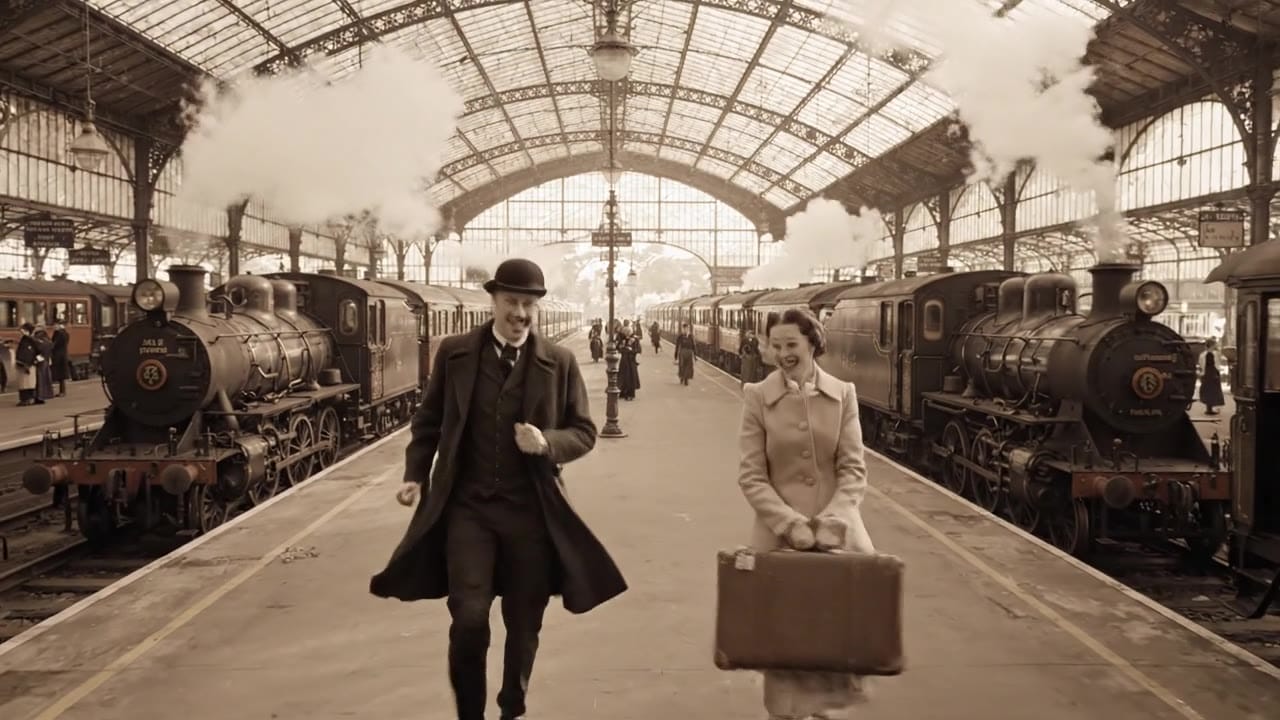
Veo 3.1 Lite is most reliable when you write a short shot brief: one subject, one action, clear framing, and one camera move.
These side-by-side comparisons break down price, resolution, audio, speed, and motion style so you can pick the right engine fast.
Each page includes real outputs and practical best-use cases.
Use Veo 3.1 Fast for affordable text prompts, start-image animation, multi-reference guidance, optional last-frame control, and extend workflows with optional native audio inside one unified MaxVideoAI model page.
Compare Veo 3.1 Lite vs Google Veo 3.1 Fast →Generate cinematic Veo 3.1 videos with text prompts, start-image animation, multi-reference guidance, optional last-frame control, and extend workflows in one unified MaxVideoAI model page.
Compare Veo 3.1 Lite vs Google Veo 3.1 →Create rich AI-generated videos from text or image prompts using Sora 2. Native voice-over, ambient effects, and motion sync via MaxVideoAI.
Compare Veo 3.1 Lite vs OpenAI Sora 2 →The limits that shape your renders.
Built for rapid testing and volume when you need ideas fast. Use it to explore hooks, angles, and pacing.
The same prompt structure upgrades cleanly to the premium tiers. Treat Lite as your draft layer.
Built-in safeguards and best practices for responsible creation with Veo 3.1 Lite.
Yes. Veo 3.1 Lite is a good fit for cheaper image-to-video tests, short audio-ready drafts, and quick prompt checks before moving winners into higher Veo tiers.
Use Veo 3.1 Lite for the cheapest Veo tests, social variants, and internal reviews; switch to Veo 3.1 Fast or Veo 3.1 when you need more control or higher-end finals.
Yes. Veo 3.1 Lite supports 16:9 and 9:16 at 720p or 1080p. Choose 9:16 for mobile-first placements.
Yes. Clone a Veo 3.1 render, change engine to Veo 3.1 Lite, keep framing/tone presets, and adjust length/resolution.
Veo 3.1 Lite is cheaper per second than the other Veo tiers on MaxVideoAI: $0.07/s at 720p or $0.11/s at 1080p, with audio included. Google direct API pricing may differ.
Yes. It uses the same MaxVideoAI wallet/workspace and managed provider routing — no separate billing needed.


